


BeFriend: make friends nearby
4.44.25K Reviews
App Specs
- Version
- 11.6.3
- Updated On
- License
- Free
- Downloads
- 5,000,000+
- Developer
- ORBITECH PTE. LTD.
- Categories
- Social
- Platform
- Android, iOS
Screenshots

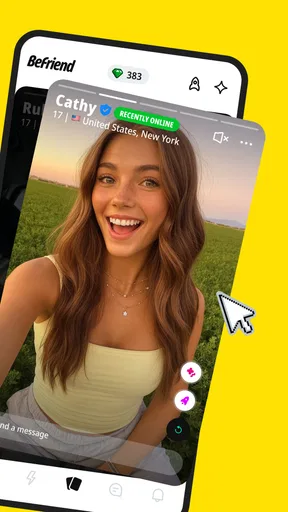
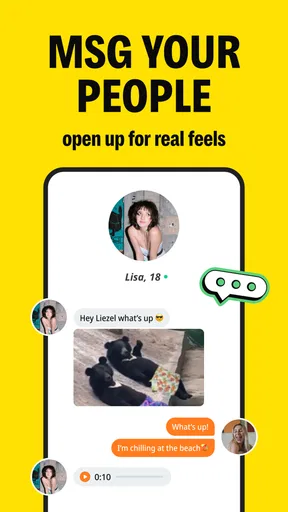
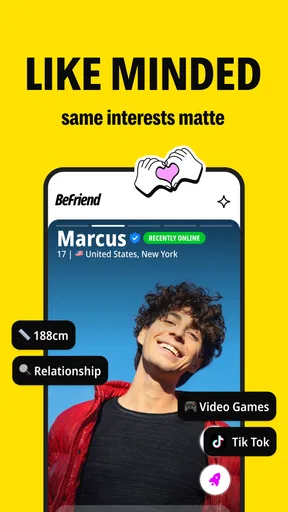
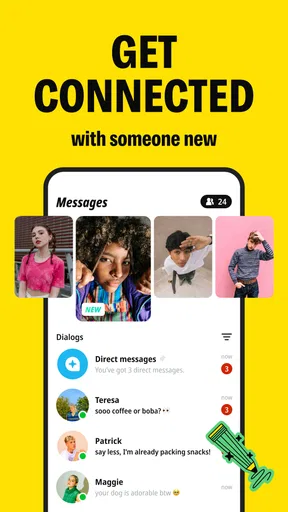
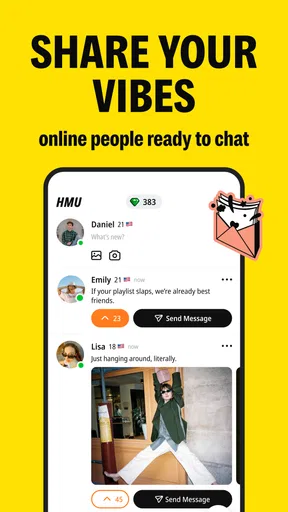

 Analysis by AppCompare
I think the most useful way to approach BeFriend is as a starting point, not a promise that a new friendship will appear on demand. You can use it to find people beyond the circles you already know, but the app can only open the door; the conversation and follow-through are still up to you. That makes it most appealing when you have a clear reason to meet someone, such as settling into a new neighborhood, looking for a companion for a hobby, or wanting more social contact without treating every interaction like a date.
Choose a reason before you start swiping
Before building a profile, I’d take a minute to decide what “making friends” means for me right now. Am I hoping to find someone to chat with, a local person who shares a hobby, or a potential companion for an activity? That small bit of clarity makes it easier to choose interests and judge whether a match feels relevant. A long list of broad interests may look welcoming, but a few specific, honest details give someone a more natural opening than a profile that tries to appeal to everyone.
This is also a good way to manage expectations. Nearby suggestions can make a new connection feel immediately practical, but being in the same area doesn’t mean two people have compatible schedules, communication styles, or plans. I’d treat location as a way to narrow the search, then look for shared interests and a conversation that feels comfortable before suggesting anything offline.
From a match to an actual plan
A realistic use case is someone who has recently moved and wants to meet people outside work. They could make a profile that says what they genuinely enjoy, browse for people with overlapping interests, and use the first conversation to find out whether there is an easy activity in common. Suggesting a low-pressure plan tied to that interest is more useful than trading small talk indefinitely. If the conversation stalls, that is a cue to move on rather than keep pushing for a response.
I’d also keep the first meeting simple and public, and let someone I trust know where I’m going. That’s sensible for meeting any person from a social app, especially when the connection is new. The app can help start contact, but it shouldn’t replace ordinary judgement about boundaries, personal information, or whether a plan feels right.
Who is likely to enjoy it
BeFriend makes the most sense for people who are open to meeting strangers and willing to take the first conversational step. It may suit a newcomer to a city, someone whose usual routine has become repetitive, or a person who wants to find peers around shared interests. It can be a useful nudge for an introvert too, provided they are comfortable beginning with a message and moving at their own pace.
On the other hand, I would skip it if you only want to keep up with existing friends, prefer to meet people exclusively through established communities, or find profile-based discovery stressful. A local hobby group, a class, or a community organized around an activity may be a better fit if you want the shared setting to do more of the social work. Those routes can offer a clearer reason to talk, while an app match still needs both people to turn interest into a plan.
Worth Reading Before You Choose

EA SPORTS FC Mobile 26 Is a Bigger Football Game, but It Takes Time

Flipboard Shows What News Apps Must Do Beyond the Feed

Switching to Android Auto Means Rethinking Your Driving Routine

Google Calendar Makes a Crowded Week Easier to Manage

Ludo King Makes the Most of the Minutes Between Plans

Baby Panda World Brings Quick Play to Modern Phones, but Its Game Library Feels Busy
How it fits beside familiar social apps
BeFriend sits in the social-app space but puts discovery of new people at the center. That gives it a different job from a messaging app, where you usually need a contact before you can start chatting, or a broad social network, where feeds and existing connections can dominate your attention. Compared with meeting people through a hobby community, it can make discovery feel more direct, but it cannot provide the same built-in activity or shared commitment.
That trade-off is worth keeping in mind when choosing where to spend your time. If you already know the kind of person or activity you’re looking for, an interest-led community may get you to a useful conversation faster. If you don’t have a ready-made group and want to explore who is nearby, BeFriend offers a more direct starting point. I’d use it alongside real-world routines rather than expecting it to replace them.
So, I recently downloaded BeFriend: make friends nearby and decided to give it a whirl. Let me tell you, it's not just another app clogging up your home screen. If you're looking to expand your social circle without the hassle, this might just be your new fav. Let's dive into what makes this app tick.
Getting Started with BeFriend
First off, installing BeFriend: make friends nearby is a breeze. It’s available on both Android and iOS, and the download process is smoother than a fresh jar of Skippy. Once installed, you're greeted with a clean and intuitive interface that just feels welcoming.
Setting up your profile is as easy as pie. You can link it with your existing social media accounts or go the email route if you prefer. Either way, in no time, you’ll have your profile ready to attract some new pals. The app prompts you to add a few interests, which helps in matching you with like-minded folks in your vicinity. Trust me, the more genuine you are with your interests, the better connections you’ll make.
Features That Stand Out
Now, let’s talk about the features. BeFriend isn't just about swiping left or right. It’s packed with some cool stuff that makes meeting new people fun and engaging.
- Nearby Connections: The app uses your location to suggest people around you. It’s perfect if you’ve just moved to a new city or are looking to meet people in your current area.
- Interest-Based Groups: This feature lets you join groups based on your hobbies or passions. Whether you’re into hiking, gaming, or coffee tasting, there's a group waiting for you.
- Events Calendar: BeFriend features an events calendar where you can see local happenings. It’s like having a social secretary in your pocket.
These features are designed to encourage real-life meetups, which is a breath of fresh air in today’s digital age.
User Experience
Using BeFriend feels like hanging out with a friend who always has your back. The app runs smoothly, with no lagging or crashing, which is crucial when you're chatting with a potential new friend. The messaging system is straightforward, and the notifications are just the right amount of subtle—not too overbearing, but enough to keep you in the loop.
The developers have done a commendable job in ensuring the app is user-friendly. Navigating through different sections is seamless, and everything is right where you expect it to be. It’s like the app knows what you want before you do!
Safety and Privacy
In today’s world, safety and privacy are paramount, and BeFriend gets that. The app has several layers of security to protect user data. From profile verification processes to report features, you can rest assured that your safety is a priority. There are options to block or report users if things get uncomfortable, which provides peace of mind.
My Final Thoughts
Overall, my experience with BeFriend has been a positive one. It’s an app that genuinely strives to bring people together, breaking the barriers of digital communication and encouraging real-life interactions. Whether you're an introvert trying to step out of your comfort zone or an extrovert looking to expand your social network, BeFriend: make friends nearby is worth a shot.
So, next time you find yourself twiddling your thumbs on a weekend, give BeFriend a try. You never know, your next best friend might be just a click away.
Practical expectations before you install
BeFriend is a free social app from ORBITECH PTE. LTD. It has an average rating of 4.4 from around 79,000 ratings, and more than 5 million installs, so it has attracted a sizeable audience. The app is rated Teen, which is worth noting for households deciding what younger users can access. It first appeared in November 2020; version 11.2.1 supports Android 8.0 and later. Optional in-app purchases range from about $0.99 to $84.99 per item, so I’d check the purchase screen carefully and avoid assuming every extra is necessary to meet people.
For a first session, I’d keep the workflow deliberately small: make a profile that gives a clear picture of your interests, look through nearby suggestions, and start only a couple of conversations that have a real point of connection. That is less tiring than swiping for a long stretch and gives you a better chance of noticing who seems compatible. If you are using the app to find people for a particular hobby, mention what you actually do rather than only naming the hobby; a specific detail can give a new match something easy to ask about.
Make the first exchange easier to answer
A useful message does not need to be clever. I’d refer to one shared interest and ask a question that can be answered without writing an essay. If the other person replies, build on their answer; if they don’t, leave room for the conversation to end without treating silence as a challenge. This keeps the interaction relaxed and helps distinguish genuine mutual interest from a match that looks promising only on a screen.
There is a trade-off in location-based discovery: nearby people are more plausible candidates for meeting, but a small or quiet local pool can make the experience feel limited. In that situation, I would broaden the kind of activity I’m open to or use BeFriend as one route among several, rather than repeatedly refreshing the same search and expecting a different result. A city-wide class or community event may be more effective when the immediate neighborhood does not offer many suitable connections.
Privacy, pace, and age awareness
Because this is a social app for meeting people, I’d share personal details gradually. A profile can communicate personality without exposing a home address, regular schedule, or other information that makes it easy to locate you. Before moving a conversation to another service or meeting in person, I’d make sure I’m comfortable with the person and keep the first plan in a public place. Blocking or reporting is the sensible response if someone ignores boundaries; there is no need to keep engaging just to be polite.
The Teen content rating is also a reminder that the app is not intended only for adults. Parents and younger users should make choices together about profile details, conversations, and in-person plans. A rating does not remove the need for caution, and a friendly tone in a chat is not proof that someone is trustworthy. For adults who want a strictly age-specific or professionally moderated community, a service built around that narrower purpose may be a better choice.
When another route may work better
BeFriend is most useful when you want a direct way to discover people and are prepared to carry the interaction forward. It is less compelling if you are looking for a ready-made club with scheduled activities, a professional networking space, or a feed for friends you already know. In those cases, an activity group, a workplace network, or a familiar messaging service serves a clearer purpose. The app’s advantage is the chance to begin with someone new; its limitation is that every match still depends on two people finding a reason to continue.
I’d give it a try if expanding your circle is an actual goal rather than a vague hope, and I’d judge it by the quality of a few conversations instead of the number of profiles viewed. Keep your expectations measured, protect your boundaries, and move toward a simple shared activity only when the exchange feels mutual. Used that way, BeFriend can be a practical first step toward meeting new people, without asking it to do the work of building a friendship for you.
Pros
- User-friendly interface for easy navigation.
- Allows you to find friends based on interests.
- Real-time chat feature for instant communication.
- Customizable profiles for personal expression.
- Offers location-based friend suggestions.
Cons
- Limited to users within a specific area.
- Requires constant internet connection.
- Some features locked behind paywall.
- Profile verification can be inconsistent.
- Notifications can be overwhelming.
FAQs for BeFriend: make friends nearby
What is BeFriend, and how does it work?
BeFriend is a social networking app designed to help users connect with new friends nearby. It uses location services to show profiles of people in your area who share similar interests. You can swipe through profiles, send messages, and arrange meetups to build friendships. The app is user-friendly with a clean interface, making it easy to navigate.
Is BeFriend safe to use?
BeFriend prioritizes user safety with several features. It includes privacy settings that allow you to control who can see your profile and send you messages. Additionally, the app has reporting and blocking options for any unwanted interactions. BeFriend also employs moderation to ensure a safe environment for all users.
Does BeFriend have any age restrictions?
Yes, BeFriend is intended for users who are 18 years of age or older. This age restriction is in place to ensure a mature and responsible user base. Users are required to verify their age during the signup process, which helps in maintaining a safe and appropriate community for everyone involved.
Are there any in-app purchases or subscription fees in BeFriend?
BeFriend offers a free version with basic features, but there are optional in-app purchases and subscription plans. These may include premium features like unlimited swipes, ad-free experience, and enhanced profile visibility. The subscriptions provide an enriched user experience, but the app remains fully functional without them.
What permissions does BeFriend require on my device?
BeFriend requires access to certain device permissions to function effectively. These include location services to find nearby users, access to contacts if you choose to invite friends, and notifications to keep you updated on new messages or matches. All permissions are optional and can be managed in your device's settings.


